Using Headless CMS in Projects: Strapi, TinaCMS, Hygraph, WordPress
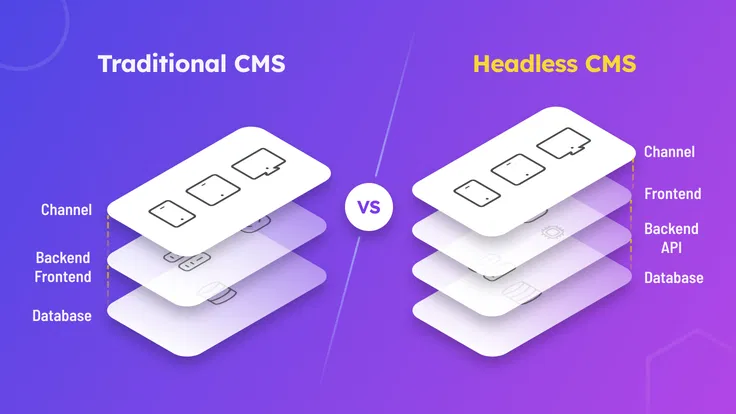
Headless CMS is a modern way to manage content where the editorial layer is separated from presentation. These systems make it easy to edit text, images, and page structure, then deliver data via API to a frontend, bot, mobile app, or Telegram Mini App.
What Is a Headless CMS
Classic CMS platforms (for example, WordPress) include both a content management panel and templates for rendering pages. A headless CMS is only the management panel. It delivers content through an API, while the user interface is built from scratch on any framework or natively.
Advantages of a Headless CMS
- 🧩 Flexibility: content presentation is controlled by the developer.
- 🔄 Versatility: one content source for all platforms.
- ⚡ Speed: the frontend loads faster because logic is separated.
- 🌍 Multilingual support, roles, and localization.
- 🔐 Security: no direct public access to the CMS.
Use Cases
A headless CMS works well for:
- Corporate websites, landing pages, and blogs.
- Online stores with a separate storefront.
- Telegram Mini Apps with dynamic content.
- Auto-posting scenarios in Telegram bots.
- Embedding a CMS into CRM, ERP, and other tools.
Use in Telegram
Content from a CMS can be used in:
- Bots — to auto-generate messages (for example, lists of promotions, services, and updates).
- Mini Apps — to dynamically load products, posts, media, and more.
Example Usage Diagram

Popular Headless CMS Platforms
| CMS | Characteristics |
|---|---|
| Strapi | Node.js CMS, REST and GraphQL, customizable schemas, locale support |
| TinaCMS | Git-based CMS, edit content directly on the site, runs in the browser |
| Hygraph | GraphQL-first, high performance, scalability, custom models |
| WordPress (headless mode) | REST API / WPGraphQL, using only the editorial part without a theme |
Usage Examples
📦 Online Store
- The CMS manages the product catalog.
- The storefront is a separately built interface (for example, on Next.js).
- Data is delivered through an API.
- A Telegram Mini App connects to the same data without duplicating logic.
📚 Blog and Articles
- Content is created in the CMS editor.
- It is published on the website, in a mobile app, bot, or Telegram Web App.
- Convenient management of SEO, headings, and multilingual content.
📢 Auto-Posting to a Bot
- An entry is created in the CMS (for example, a news item, promotion, or update).
- The backend listens for events or periodically checks for updates.
- On publish, a message is sent to a Telegram channel or group.
When to Use a Headless CMS
- ✅ When you need one content hub for multiple platforms.
- ✅ When custom design matters more than a template system.
- ✅ When working with an editorial team that needs a simple admin panel.
- ✅ In startups where the CMS connects to the frontend, bot, and other channels without extra code.
Conclusion
A headless CMS is a convenient, modern tool for businesses, startups, and media platforms. With the right architecture and setup, the system enables fast scaling, content reuse, and high performance. The choice between Strapi, TinaCMS, Hygraph, or WordPress depends on the specific goals, team, and project requirements.